
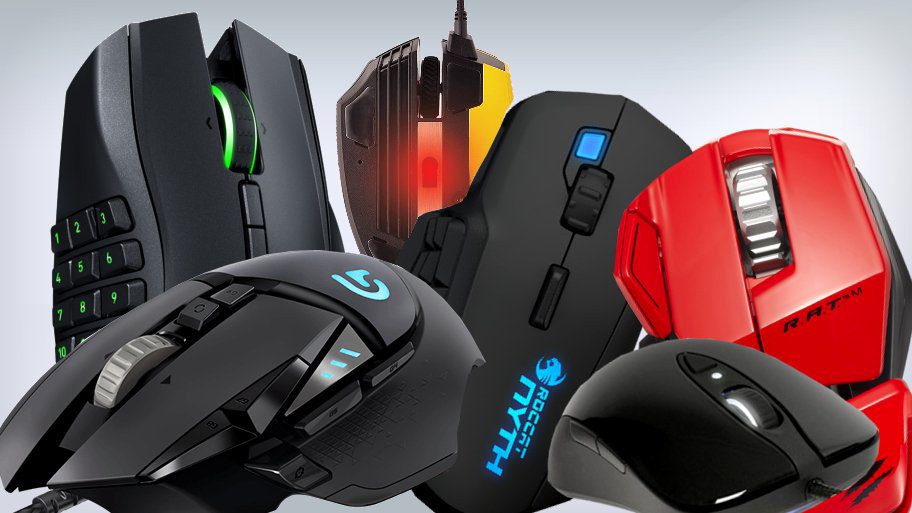
Did you know that professional eSports players make an average of 400 actions per minute during intense gameplay? Every millisecond counts, and your gaming mouse is the bridge between your reflexes and in-game performance. If you’re searching for the best gaming mouse in India, you’ve landed at the right place.
Whether you’re battling in VALORANT, grinding through Elden Ring, or conquering opponents in BGMI, a subpar mouse can be the difference between victory and defeat. Input lag, sensor inconsistencies, and uncomfortable grips can sabotage even the most skilled players.
In this comprehensive guide, we’ll walk you through the top 10 gaming mice available in India for 2025. You’ll discover detailed reviews, specification comparisons, buying tips, and answers to all your questions. By the end, you’ll know exactly which gaming mouse suits your play style, budget, and hand size.
What Is a Gaming Mouse? Definition and Key Features
A gaming mouse is a specialized computer peripheral designed for optimal performance in video games. Unlike regular office mouse, gaming mice feature high-precision optical or laser sensors (up to 25,600 DPI), customizable buttons, adjustable weight systems, and polling rates up to 8000Hz for near-instantaneous response times. These devices are engineered to deliver accuracy, speed, and comfort during extended gaming sessions.
Key Features That Separate Gaming Mice from Regular Mice
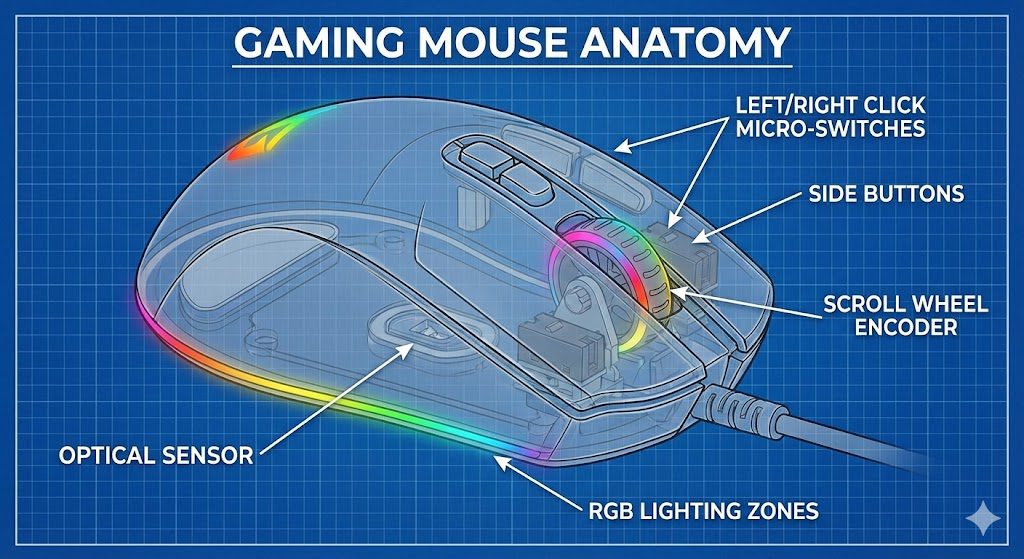
Understanding what makes a gaming mouse special helps you make an informed purchase decision. Here are the critical features that differentiate gaming peripherals from standard computer mice:
- High-Precision Sensors: Gaming mice use advanced optical or laser sensors capable of tracking movements with extreme accuracy. Premium models offer DPI (dots per inch) ranging from 100 to 25,600, allowing micro-adjustments for different game scenarios.
- Polling Rate: This measures how often the mouse reports its position to the computer. Gaming mice typically offer 1000Hz polling (1ms response), with flagship models reaching 4000Hz or 8000Hz for competitive advantage.
- Programmable Buttons: Most gaming mice feature 5-20 programmable buttons for macros, weapon switching, ability casting, and custom commands. This is crucial for MMO and MOBA players.
- Ergonomic Design: Gaming sessions can last hours. Quality gaming mice are designed for palm, claw, or fingertip grip styles with contoured shapes that reduce fatigue and strain.
- Durable Switches: Gaming mice use mechanical or optical switches rated for 50-80 million clicks, far exceeding the 3-5 million click lifespan of standard office mice.
- RGB Lighting: While primarily aesthetic, RGB lighting can be synchronized with in-game events or customized to match your gaming setup’s theme.

Why Indian Gamers Need a Quality Gaming Mouse in 2026
The Indian gaming industry has witnessed explosive growth, with the market projected to reach $7 billion by 2026. Competitive gaming tournaments like BGMI Pro Series, VALORANT Conquerors Championship, and various regional leagues have created a thriving eSports ecosystem. For Indian gamers looking to compete or simply enjoy their favorite titles, investing in the best gaming mouse in India is no longer optional—it’s essential.
The Competitive Edge Factor
In fast-paced shooters like CS2 and VALORANT, reaction time determines outcomes. A gaming mouse with a 1ms response time gives you a measurable advantage over opponents using standard 8ms mice. This 7-millisecond difference might seem trivial, but in professional play, headshots are won and lost in smaller margins.
Comfort During Extended Sessions
Indian gamers often play for 4-8 hours daily. Using an ergonomic gaming mouse prevents repetitive strain injuries (RSI), carpal tunnel syndrome, and general hand fatigue. The right mouse shape for your grip style ensures you can game longer without discomfort.
Value for Money in the Indian Market
The Indian gaming peripheral market offers options across all price segments. From budget-friendly choices under ₹1,500 to premium wireless options above ₹10,000, there’s a gaming mouse for every budget. Understanding specifications helps you get maximum value without overspending on features you won’t use.
How to Choose the Best Gaming Mouse: Complete Buying Guide
Selecting the right gaming mouse requires understanding your specific needs. This section breaks down every factor you should consider before making a purchase.
1. Sensor Type: Optical vs Laser
The sensor is the heart of any gaming mouse. Modern gaming mice use either optical or laser sensors, each with distinct characteristics.
Optical Sensors use LED light to track movement and work best on cloth mousepads. They offer consistent tracking without acceleration issues. Top optical sensors include the PixArt PAW3395, PMW3370, and Razer Focus Pro. These are preferred by competitive FPS players for their reliable, predictable movement.
Laser Sensors can work on almost any surface, including glass. They typically offer higher maximum DPI but may exhibit slight acceleration on certain surfaces. Modern laser sensors like the Logitech HERO 25K have largely eliminated these issues.
Recommendation: For most Indian gamers, optical sensors provide the best balance of performance and consistency. Choose laser only if you need multi-surface flexibility.
2. DPI Range and Sensitivity Settings
DPI (dots per inch) determines how far your cursor moves relative to physical mouse movement. Higher DPI means the cursor travels further with less hand movement.
- Low DPI (400-800): Preferred by professional FPS players for precise aiming. Requires larger arm movements but offers excellent accuracy.
- Medium DPI (800-1600): Balanced setting suitable for most games and general use. Good starting point for beginners.
- High DPI (1600-3200): Useful for high-resolution displays and fast-paced games. Popular among MOBA and RTS players.
- Ultra-High DPI (3200+): Marketing feature for most users. Only beneficial for 4K+ displays or specific professional applications.
Pro Tip: Don’t chase maximum DPI numbers. A 25,600 DPI mouse isn’t inherently better than a 16,000 DPI one. Focus on sensor accuracy and consistency instead.
3. Polling Rate Explained
Polling rate indicates how frequently the mouse sends position data to your computer, measured in Hertz (Hz). Higher polling rates mean smoother cursor movement and lower input lag.
- 125Hz: 8ms response time. Found in basic office mice. Not recommended for gaming.
- 500Hz: 2ms response time. Entry-level gaming standard. Adequate for casual gaming.
- 1000Hz: 1ms response time. Industry standard for competitive gaming. Matches most 144Hz+ monitor refresh rates.
- 4000Hz-8000Hz: 0.25-0.125ms response time. Premium feature for hardcore competitive players. Requires compatible hardware.
4. Wired vs Wireless Gaming Mice
The wired vs wireless debate has evolved significantly. Modern wireless gaming mice offer performance comparable to wired alternatives, but each has advantages.
Wired Gaming Mice Advantages:
- Zero latency concerns with consistent connection
- No battery to charge or replace
- Generally lighter weight without battery
- Lower price for equivalent specifications
Wireless Gaming Mice Advantages:
- Freedom of movement without cable drag
- Cleaner desk setup and portability
- Modern wireless tech matches wired latency (sub-1ms)
- Battery life of 70-140+ hours on premium models
5. Grip Styles and Ergonomics
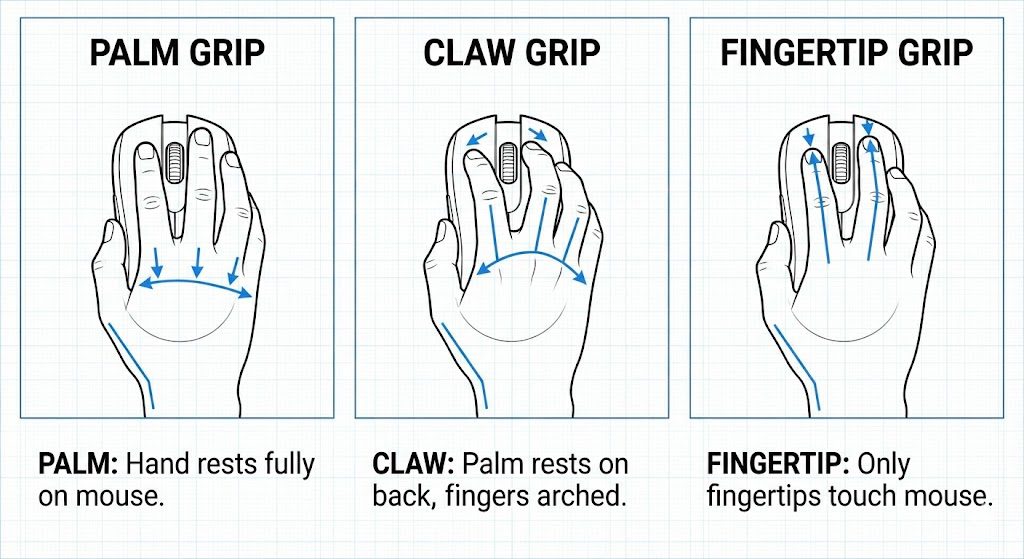
Your grip style significantly impacts comfort and mouse selection. Most gamers naturally fall into one of three categories:
Palm Grip: Your entire hand rests on the mouse with fingers flat on buttons. Ideal for larger hands and those who prefer arm-aiming. Best suited for larger, ergonomic mice like the Logitech G502 or Razer DeathAdder.
Claw Grip: Palm touches the back of the mouse while fingers arch over buttons. Offers quick clicking with good control. Works well with medium-sized mice with pronounced humps like the Zowie EC2 or Pulsar X2.
Fingertip Grip: Only fingertips touch the mouse with palm floating. Provides maximum agility for quick flicks. Requires lightweight, smaller mice like the Finalmouse Ultralight or Logitech G Pro X Superlight.
6. Weight Considerations
Mouse weight affects control and fatigue. The ideal weight depends on your play style and grip:
- Ultralight (Under 60g): Perfect for fast flick-heavy games. Requires precise control. Examples: Finalmouse Ultralight (47g), Logitech G Pro X Superlight (63g).
- Lightweight (60-80g): Sweet spot for most competitive gamers. Balanced speed and control. Most popular weight class.
- Medium (80-100g): Traditional gaming mouse weight. Good for beginners and those preferring more inertia.
- Heavy (100g+): Preferred for precision work and MMO gameplay. Some mice offer adjustable weights.
7. Button Count and Programmability
The number of buttons you need depends on your game genre:
- FPS Games (5-6 buttons): Left/right click, scroll wheel, two side buttons, and DPI switch. Simple and effective.
- MOBA Games (6-8 buttons): Additional buttons for ability shortcuts and item activation.
- MMO Games (12+ buttons): Grid of thumb buttons for extensive hotkey mapping. Mice like Razer Naga and Logitech G600.
Top 10 Best Gaming Mouse in India 2026: Detailed Reviews
After extensive testing and research, we’ve compiled the definitive list of the best gaming mouse in India for 2025. Each recommendation has been evaluated for sensor performance, build quality, ergonomics, software support, and value for Indian consumers.
1. Logitech G Pro X Superlight 2 – Best Overall Gaming Mouse
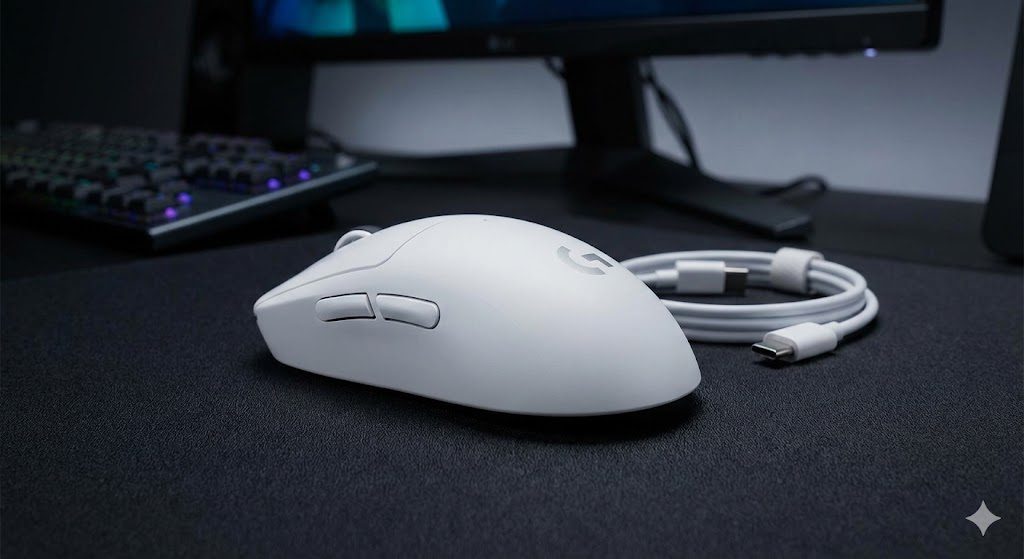
The Logitech G Pro X Superlight 2 represents the pinnacle of wireless gaming mouse technology. Weighing just 60 grams, this mouse has become the weapon of choice for countless professional eSports players worldwide.
Key Specifications
- Sensor: HERO 2 (32,000 DPI)
- Polling Rate: Up to 8000Hz (LIGHTSPEED wireless)
- Weight: 60 grams
- Battery Life: 95 hours
- Buttons: 5 programmable
- Switch: LIGHTFORCE hybrid optical-mechanical
- Price in India: ₹14,995 – ₹16,995
Pros
Cons
Verdict
The G Pro X Superlight 2 is the best gaming mouse in India for competitive players willing to invest in premium performance. If you’re serious about ranked play in VALORANT, CS2, or Apex Legends, this is the gold standard.
2. Razer DeathAdder V3 Pro – Best Ergonomic Gaming Mouse
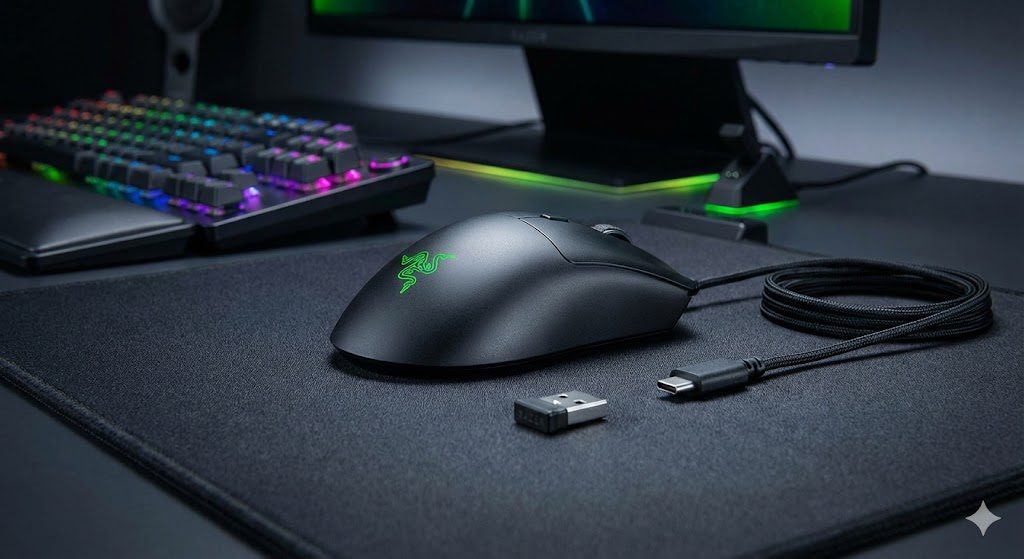
The Razer DeathAdder series has sold over 15 million units globally, and the V3 Pro represents the ultimate evolution. This ergonomic right-handed mouse is perfect for palm grip users seeking comfort and performance.
Key Specifications
- Sensor: Razer Focus Pro (30,000 DPI)
- Polling Rate: Up to 4000Hz (HyperPolling wireless)
- Weight: 63 grams
- Battery Life: 90 hours
- Buttons: 5 programmable
- Switch: Razer Optical Gen-3 (90M clicks)
- Price in India: ₹13,999 – ₹15,999
Pros
Cons
Verdict
The DeathAdder V3 Pro is the definitive choice for palm grip gamers who prioritize comfort. If you’ve always loved the DeathAdder shape but wanted wireless freedom and lighter weight, this is your endgame mouse.
3. Logitech G502 X Plus – Best Feature-Rich Gaming Mouse
The Logitech G502 series has been a fan favorite for years, and the G502 X Plus brings modern upgrades while maintaining the beloved shape. This mouse appeals to gamers who want versatility, customization, and premium features.
Key Specifications
- Sensor: HERO 25K (25,600 DPI)
- Polling Rate: 1000Hz
- Weight: 106 grams
- Battery Life: 130 hours (37 with RGB)
- Buttons: 13 programmable
- Switch: LIGHTFORCE hybrid optical-mechanical
- Price in India: ₹13,495 – ₹14,995
Pros
Cons
Verdict
The G502 X Plus excels for gamers who want everything: precision, customization, and aesthetics. Ideal for those playing multiple game genres or using their mouse for both gaming and productivity.
4. Razer Viper V3 Pro – Best Ultralight Gaming Mouse
At just 54 grams, the Razer Viper V3 Pro is among the lightest wireless gaming mice ever made. This ultralight design makes it exceptional for fast-paced competitive gaming where every gram matters.
Key Specifications
- Sensor: Razer Focus Pro (35,000 DPI)
- Polling Rate: Up to 8000Hz
- Weight: 54 grams
- Battery Life: 95 hours
- Buttons: 5 programmable
- Switch: Razer Optical Gen-3 (90M clicks)
- Price in India: ₹15,999 – ₹17,999
Pros
Cons
Verdict
The Viper V3 Pro is for serious competitive gamers who want the absolute lightest wireless mouse with no compromises in sensor technology or build quality. Perfect for VALORANT and CS2 enthusiasts.
5. SteelSeries Aerox 3 Wireless – Best Lightweight Gaming Mouse Under ₹10,000
The SteelSeries Aerox 3 Wireless brings ultralight wireless gaming to a more accessible price point. Its honeycomb design and impressive specifications make it excellent value for Indian gamers.
Key Specifications
- Sensor: TrueMove Air (18,000 DPI)
- Polling Rate: 1000Hz
- Weight: 68 grams
- Battery Life: 200 hours (80 with RGB)
- Buttons: 6 programmable
- Switch: SteelSeries mechanical (80M clicks)
- Price in India: ₹8,499 – ₹9,999
Pros
Cons
Verdict
The Aerox 3 Wireless is the best gaming mouse in India for gamers wanting wireless lightweight performance without premium pricing. Excellent entry point for competitive gaming.
6. HyperX Pulsefire Haste 2 Wireless – Best Mid-Range Gaming Mouse
HyperX’s Pulsefire Haste 2 Wireless delivers exceptional value with solid construction, reliable wireless performance, and a comfortable shape at a competitive price point.
Key Specifications
- Sensor: PAW3395 (26,000 DPI)
- Polling Rate: Up to 8000Hz
- Weight: 61 grams
- Battery Life: 100 hours
- Buttons: 6 programmable
- Switch: HyperX mechanical (100M clicks)
- Price in India: ₹7,499 – ₹8,999
Pros
Cons
Verdict
The Pulsefire Haste 2 Wireless offers incredible value for competitive gamers. With 8000Hz polling and solid construction at under ₹9,000, it punches well above its weight class.
7. Logitech G304 Lightspeed – Best Budget Gaming Mouse Under ₹3,000
The Logitech G304 proves you don’t need to spend big for excellent wireless gaming performance. This budget champion brings HERO sensor technology to an accessible price point.
Key Specifications
- Sensor: HERO 12K (12,000 DPI)
- Polling Rate: 1000Hz
- Weight: 99 grams (with battery)
- Battery Life: 250 hours (AA battery)
- Buttons: 6 programmable
- Switch: Omron mechanical (10M clicks)
- Price in India: ₹2,495 – ₹2,995
Pros
Cons
Verdict
The G304 is the undisputed king of budget gaming mouse options in India. Perfect for students, casual gamers, and anyone wanting wireless freedom without the premium price.
8. Razer Basilisk V3 Pro – Best Customizable Gaming Mouse
The Razer Basilisk V3 Pro is designed for gamers who want maximum control and customization. With its unique scroll wheel system and extensive button mapping, it excels in versatility.
Key Specifications
- Sensor: Razer Focus Pro (30,000 DPI)
- Polling Rate: Up to 4000Hz
- Weight: 112 grams
- Battery Life: 90 hours
- Buttons: 11 programmable
- Switch: Razer Optical Gen-3 (90M clicks)
- Price in India: ₹13,999 – ₹15,999
Pros
Cons
Verdict
The Basilisk V3 Pro is perfect for gamers who want extensive customization without sacrificing performance. Excellent for productivity-gaming hybrid users.
9. Razer Naga V2 Pro – Best MMO Gaming Mouse
For MMO and MOBA enthusiasts, the Razer Naga V2 Pro remains unrivaled. Its innovative swappable side plate system allows you to customize button layouts for different game genres.
Key Specifications
- Sensor: Razer Focus Pro (30,000 DPI)
- Polling Rate: Up to 4000Hz
- Weight: 134 grams
- Battery Life: Up to 150 hours
- Buttons: Up to 22 programmable (with 12-button plate)
- Switch: Razer Optical Gen-3 (90M clicks)
- Price in India: ₹17,999 – ₹19,999
Pros
Cons
Verdict
If you play World of Warcraft, Final Fantasy XIV, Lost Ark, or League of Legends, the Naga V2 Pro is the definitive MMO gaming mouse choice in India.
10. Cosmic Byte Equinox Gamma – Best Budget Wired Gaming Mouse
For Indian gamers on a tight budget, the Cosmic Byte Equinox Gamma proves you can get solid gaming performance without breaking the bank. This homegrown brand delivers impressive value.
Key Specifications
- Sensor: PixArt PMW3325 (10,000 DPI)
- Polling Rate: 1000Hz
- Weight: 85 grams
- Cable: 1.8m braided
- Buttons: 7 programmable
- Switch: Mechanical (20M clicks)
- Price in India: ₹1,299 – ₹1,599
Pros
Cons
Verdict
The Cosmic Byte Equinox Gamma is perfect for budget-conscious Indian gamers who want to upgrade from basic office mice without significant investment.
Comparison Table: Top 10 Gaming Mice at a Glance
Use this quick reference table to compare specifications across all recommended gaming mice:
| Mouse | Sensor/DPI | Weight | Polling Rate | Connection | Buttons | Price (₹) |
| G Pro X Superlight 2 | HERO 2/32K | 60g | 8000Hz | Wireless | 5 | 14,995+ |
| DeathAdder V3 Pro | Focus Pro/30K | 63g | 4000Hz | Wireless | 5 | 13,999+ |
| G502 X Plus | HERO 25K | 106g | 1000Hz | Wireless | 13 | 13,495+ |
| Viper V3 Pro | Focus Pro/35K | 54g | 8000Hz | Wireless | 5 | 15,999+ |
| Aerox 3 Wireless | TrueMove/18K | 68g | 1000Hz | Wireless | 6 | 8,499+ |
| Pulsefire Haste 2 | PAW3395/26K | 61g | 8000Hz | Wireless | 6 | 7,499+ |
| G304 Lightspeed | HERO 12K | 99g | 1000Hz | Wireless | 6 | 2,495+ |
| Basilisk V3 Pro | Focus Pro/30K | 112g | 4000Hz | Wireless | 11 | 13,999+ |
| Naga V2 Pro | Focus Pro/30K | 134g | 4000Hz | Wireless | 22 | 17,999+ |
| Cosmic Byte Equinox | PMW3325/10K | 85g | 1000Hz | Wired | 7 | 1,299+ |
Best Gaming Mouse by Budget Category
Finding the right gaming mouse for your budget is crucial. Here’s our top pick for each price segment:
Best Gaming Mouse Under ₹2,000
Winner: Cosmic Byte Equinox Gamma (₹1,299-₹1,599)
At this price point, the Equinox Gamma delivers the best combination of sensor accuracy, build quality, and features. The PMW3325 sensor provides reliable tracking for casual and competitive gaming alike.
Best Gaming Mouse Under ₹3,000
Winner: Logitech G304 Lightspeed (₹2,495-₹2,995)
The G304 brings LIGHTSPEED wireless technology to budget gamers. With the HERO sensor and exceptional battery life, it’s the clear choice for wireless gaming on a budget.
Best Gaming Mouse Under ₹5,000
Winner: Logitech G304 Lightspeed (still the champion)
In this bracket, the G304 continues to dominate. Consider upgrading to wired alternatives like the Razer DeathAdder Essential or HyperX Pulsefire FPS Pro for ergonomic improvements.
Best Gaming Mouse Under ₹10,000
Winner: HyperX Pulsefire Haste 2 Wireless (₹7,499-₹8,999)
The Pulsefire Haste 2 Wireless offers 8000Hz polling, PAW3395 sensor, and solid construction. It’s the best value proposition for serious competitive gaming under ₹10,000.
Best Gaming Mouse Under ₹15,000
Winner: Razer DeathAdder V3 Pro (₹13,999-₹15,999)
For palm grip users seeking premium wireless performance, the DeathAdder V3 Pro delivers legendary ergonomics with modern specifications. The Logitech G Pro X Superlight 2 is equally excellent for claw/fingertip grip users.
Best Premium Gaming Mouse (₹15,000+)
Winner: Razer Viper V3 Pro (₹15,999-₹17,999)
If budget isn’t a constraint, the Viper V3 Pro’s 54g ultralight design with 8000Hz native polling represents the cutting edge of gaming mouse technology.
Best Gaming Mouse by Game Type
Different games demand different mouse characteristics. Here are our recommendations based on game genres popular in India:
Best Mouse for VALORANT and CS2
Top Picks: Logitech G Pro X Superlight 2, Razer Viper V3 Pro, HyperX Pulsefire Haste 2
Tactical shooters require precise aiming and fast flicks. Ultralight mice with high polling rates and flawless sensors excel here. Low DPI settings (400-800) are standard among professionals.
Best Mouse for BGMI and Battle Royale Games
Top Picks: Razer DeathAdder V3 Pro, Logitech G502 X Plus, SteelSeries Aerox 3
Battle royale games involve extended sessions and varied combat ranges. Ergonomic mice with comfortable grips and versatile DPI ranges perform best.
Best Mouse for League of Legends and DOTA 2
Top Picks: Razer Basilisk V3 Pro, Logitech G502 X Plus, Razer Naga V2 Pro
MOBAs benefit from additional programmable buttons for ability casting and item activation. Scroll wheel quality matters for shop navigation.
Best Mouse for MMO Games (WoW, FF14, Lost Ark)
Top Pick: Razer Naga V2 Pro (uncontested)
MMOs require extensive hotkey mapping. The Naga V2 Pro’s 12-button side panel makes it indispensable for serious MMO players managing dozens of abilities.
Best Mouse for Single-Player and Casual Gaming
Top Picks: Logitech G304, Cosmic Byte Equinox Gamma
For casual gaming and single-player titles, budget-friendly options provide more than sufficient performance without overspending on competitive features.
Gaming Mouse Care and Maintenance Tips
Proper maintenance extends your gaming mouse’s lifespan and maintains optimal performance. Follow these expert tips:
Daily Maintenance
- Wipe down the mouse surface with a dry microfiber cloth after gaming sessions.
- Store the mouse on a clean mousepad when not in use.
- Avoid eating or drinking near your gaming setup to prevent debris buildup.
Weekly Cleaning Routine
- Clean the sensor lens with a cotton swab dipped in isopropyl alcohol.
- Remove debris from button crevices using compressed air.
- Wipe down the scroll wheel to prevent dust accumulation.
- Clean your mousepad to ensure consistent tracking.
Monthly Deep Cleaning
- Inspect PTFE mouse feet for wear and replace if necessary.
- Check cable integrity for wired mice (fraying, kinks).
- Update mouse firmware and software for optimal performance.
- Calibrate sensor settings if you’ve changed mousepads.
Maximizing Battery Life (Wireless Mice)
- Turn off RGB lighting when not needed to extend battery life.
- Use lower polling rates (500Hz) for casual gaming sessions.
- Enable sleep mode settings in manufacturer software.
- Store the USB receiver in the mouse when traveling.
Where to Buy Gaming Mouse in India: Trusted Retailers
Purchasing from authorized retailers ensures warranty coverage and authentic products. Here are the most reliable options for Indian gamers:
Online Retailers
- Amazon India: Widest selection, frequent sales, reliable delivery. Look for ‘Fulfilled by Amazon’ listings.
- Flipkart: Competitive pricing, SuperCoin discounts, good return policies.
- MD Computers: Specialized PC hardware retailer with competitive prices.
- PrimeABGB: Trusted gaming peripheral specialist.
Physical Stores
- Croma/Reliance Digital: Try before you buy option. Nationwide presence.
- Local Computer Markets: Nehru Place (Delhi), Lamington Road (Mumbai), SP Road (Bangalore), Ritchie Street (Chennai).
Brand Official Stores
- Logitech G Store India: Official Logitech products with full warranty.
- Razer Store India: Authentic Razer products, exclusive releases.
Pro Tip: Always verify seller ratings, check for official brand authorization, and compare prices across platforms. Major sales events like Amazon Great Indian Festival, Flipkart Big Billion Days, and Diwali sales offer significant discounts.
Conclusion: Choosing Your Perfect Gaming Mouse
Selecting the best gaming mouse in India comes down to understanding your specific needs, play style, and budget. Let’s recap the key takeaways from this comprehensive guide:
- For competitive FPS gaming: Prioritize ultralight weight (under 65g), high polling rates, and flawless sensors. The Logitech G Pro X Superlight 2 and Razer Viper V3 Pro lead this category.
- For comfort and ergonomics: The Razer DeathAdder V3 Pro remains unmatched for palm grip users seeking all-day comfort.
- For budget-conscious gamers: The Logitech G304 Lightspeed delivers wireless freedom under ₹3,000, while the Cosmic Byte Equinox Gamma offers incredible value for wired users.
- For MMO and productivity: Extra buttons matter—consider the Razer Naga V2 Pro or Logitech G502 X Plus.
- For value seekers: The HyperX Pulsefire Haste 2 Wireless offers premium features at mid-range pricing.
Remember, the best gaming mouse is the one that feels right in your hand and fits your specific gaming needs. Take time to consider your grip style, the games you play most, and how much you’re willing to invest.
Ready to upgrade your gaming setup? Share this guide with fellow gamers, and let us know in the comments which gaming mouse you’re considering. Have questions? Drop them below, and we’ll help you make the perfect choice!
Frequently Asked Questions (FAQs)
Can I use a gaming mouse for regular office work and productivity tasks?
Absolutely! Gaming mice excel at productivity tasks due to their superior sensors, comfortable ergonomics, and programmable buttons. You can assign shortcuts for copy-paste, switching applications, or navigating spreadsheets. Many professionals prefer gaming mice for their precision in photo/video editing and CAD applications. The extra buttons prove invaluable for workflow optimization.
How often should I replace my gaming mouse’s PTFE feet?
PTFE (Teflon) mouse feet typically last 6-12 months with heavy use, though this varies based on mousepad material and gaming intensity. Signs of wear include inconsistent glide, scratching sounds, visible wear marks, or exposed adhesive. Replacement feet cost ₹200-500 and are available for most popular gaming mice. Brands like Corepad, Tiger Arc, and Hyperglides offer premium aftermarket options.
Is Bluetooth connectivity good enough for competitive gaming?
For competitive gaming, Bluetooth introduces higher latency (typically 10-30ms) compared to 2.4GHz wireless dongles (sub-1ms). Always use the dedicated USB receiver for gaming sessions. Bluetooth is acceptable for casual gaming, travel, and productivity use where minor latency isn’t critical. Many gaming mice offer both connectivity options for flexibility.
Does mouse pad surface affect gaming mouse performance?
Yes, significantly! Cloth mousepads offer more control and work well with optical sensors. Hard pads provide faster glide but may cause tracking issues with some sensors. Hybrid pads balance both characteristics. Modern gaming mice often include surface calibration features in their software to optimize tracking for your specific mousepad. For best results, use quality mousepads from brands like SteelSeries, Razer, or Zowie.
Why do some gaming mice have honeycomb (hole-filled) designs?
Honeycomb designs reduce mouse weight by removing material from the shell while maintaining structural integrity. This approach can achieve weights under 60 grams, benefiting competitive gamers who prefer ultralight mice for faster flicks and reduced fatigue. However, holes can collect dust and debris, and some users find them uncomfortable. Premium solid-shell mice now achieve similar weights through advanced materials.
What is the ideal DPI setting for gaming in India, and does it vary by game?
Optimal DPI varies by game type and personal preference. FPS players typically use 400-800 DPI for precise aiming. MOBA and RTS players often prefer 800-1600 DPI for faster cursor movement. The key is finding your effective DPI (eDPI = mouse DPI × in-game sensitivity) that allows both precise micro-adjustments and quick 180-degree turns. Most professional players use lower DPI settings than you might expect.